
Calling Hours Overview
During Managed Calling Hours, GetThru Support actively manages dialing speed to help your callers connect more efficiently.
This guide explains what Managed Calling Hours are, how they work, and what to expect when dialing outside of them.
TABLE OF CONTENTS
- What Are Managed Calling Hours?
- Managed Calling Hours
- Dialing Outside Managed Hours
- Campaign Open Hours and Time Zones
- Getting Help
What Are Managed Calling Hours?
Managed Calling Hours are times when GetThru staff monitors and adjusts ThruTalk dialing speeds to reduce wait times and prevent dropped calls. For more information about dialing speeds, review our guide ThruTalk Dial Pacing.
Managed Calling Hours
9:00 am - 8:00 pm ET | Monday - Friday
Dialing Outside Managed Hours
You can still make calls outside of managed calling hours, however, GetThru Staff doesn't actively monitor and make adjustments to dialing speed. Your campaign will use a standard default throttle and calling may not be as efficient.
Campaign Open Hours and Time Zones
During campaign creation, you can set your Campaign Open Hours, which determines when callers can place calls. Set these to occur during managed calling hours to make calls efficiently.
ThruTalk follows the industry-standard calling window of 8 AM to 9 PM local time, based on federal dialing rules designed to prevent unwanted early-morning or late-night calls. Campaigns can be open from 8:00 AM to 9:00 PM in the time zone you select for the campaign.
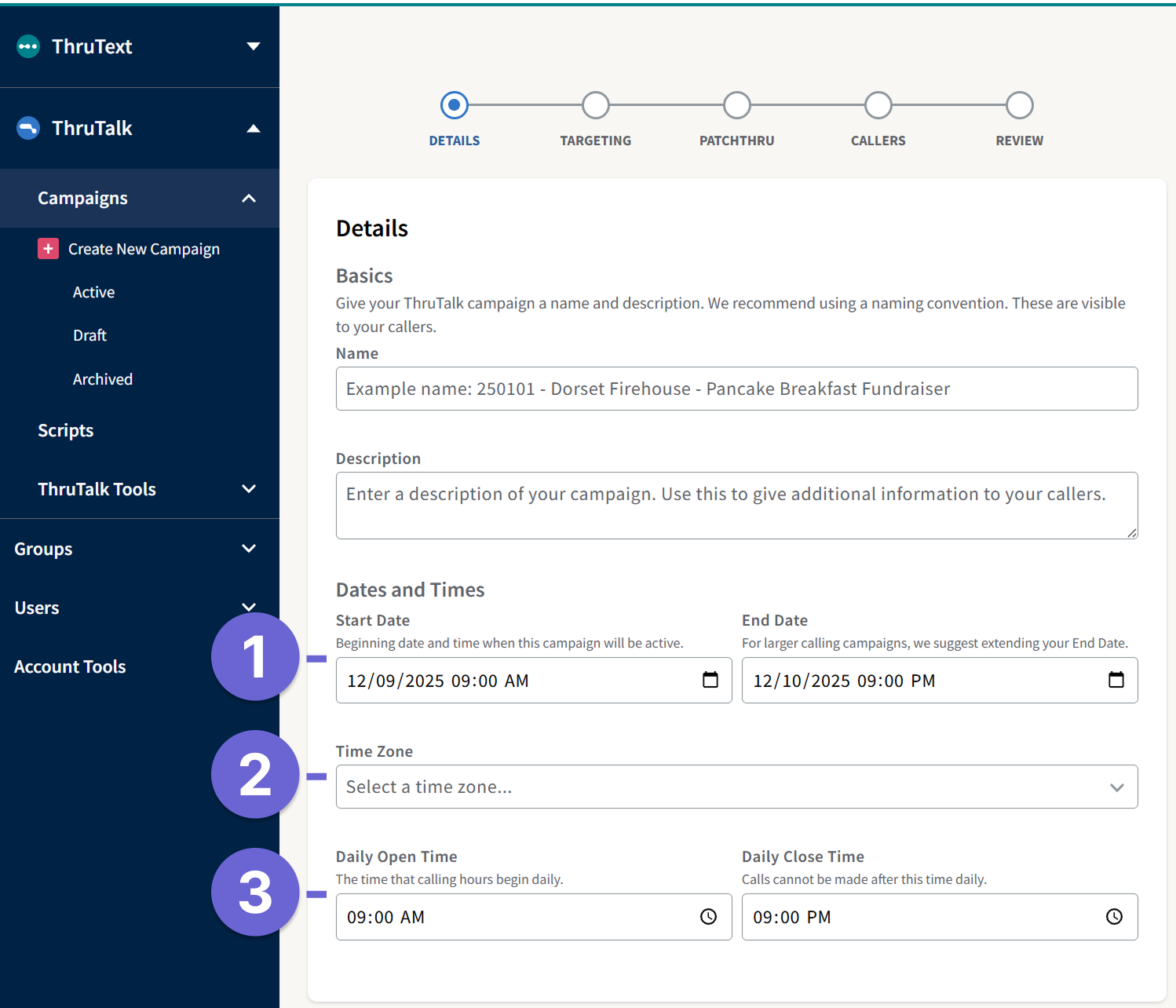
- Dates and Times: The assignment will first become available for callers on the Start Date and end on the End Date.
- Time Zone: Select the timezone that your contacts are in : Eastern, Central, Mountain, or Pacific
- Daily Open/Close Time: The hours that callers can make calls daily. Must be between 8 AM to 9 PM.
Read more about dialing hour enforcement here: Understanding Dialing Hour Enforcement.
Getting Help
If you have questions about throttles, scheduling, or live performance:
- Chat with us in-app during Support hours. See our guide Live Chat on GetThru.app for more information.
- Email support@getthru.io anytime