
Overview of Account-Level ThruTalk Exports
Account-level ThruTalk exports let you download call data from across all of your ThruTalk campaigns into CSV files. Use these exports when you want to review call activity across multiple campaigns, such as overall call volume for a quarter, caller performance over time, or a complete Do Not Call list, without opening each campaign individually.
If you only need call data for a single campaign, a campaign-level export is usually faster and easier to work with. Account-level exports are best for big-picture reporting, performance analysis, or when you plan to combine ThruTalk data with other tools or databases.
This guide explains how to access account-level ThruTalk exports, what each export type includes, and how date ranges and time zones affect your results.
TABLE OF CONTENTS
- Essential Export Notes
- How to Access Account-Level ThruTalk Exports
- Types of Account-Level Exports
- Data Review Tips
Essential Export Notes
Here are a few key points to know before you get started.
- Time Zones: All timestamps in account-level exports are stored and displayed in Coordinated Universal Time (UTC).
- Date Range Limits: Excluding DNCs, account-level ThruTalk exports are limited to a 90-day date range. If you need data for a longer time period, generate multiple exports back to back.
- Column Breakdown: For a full breakdown of export fields and definitions, see our guide on ThruTalk Export Types.
- Download Links are time-limited for security. If a link expires before you download it, you can refresh the page and click download again.
How to Access Account-Level ThruTalk Exports
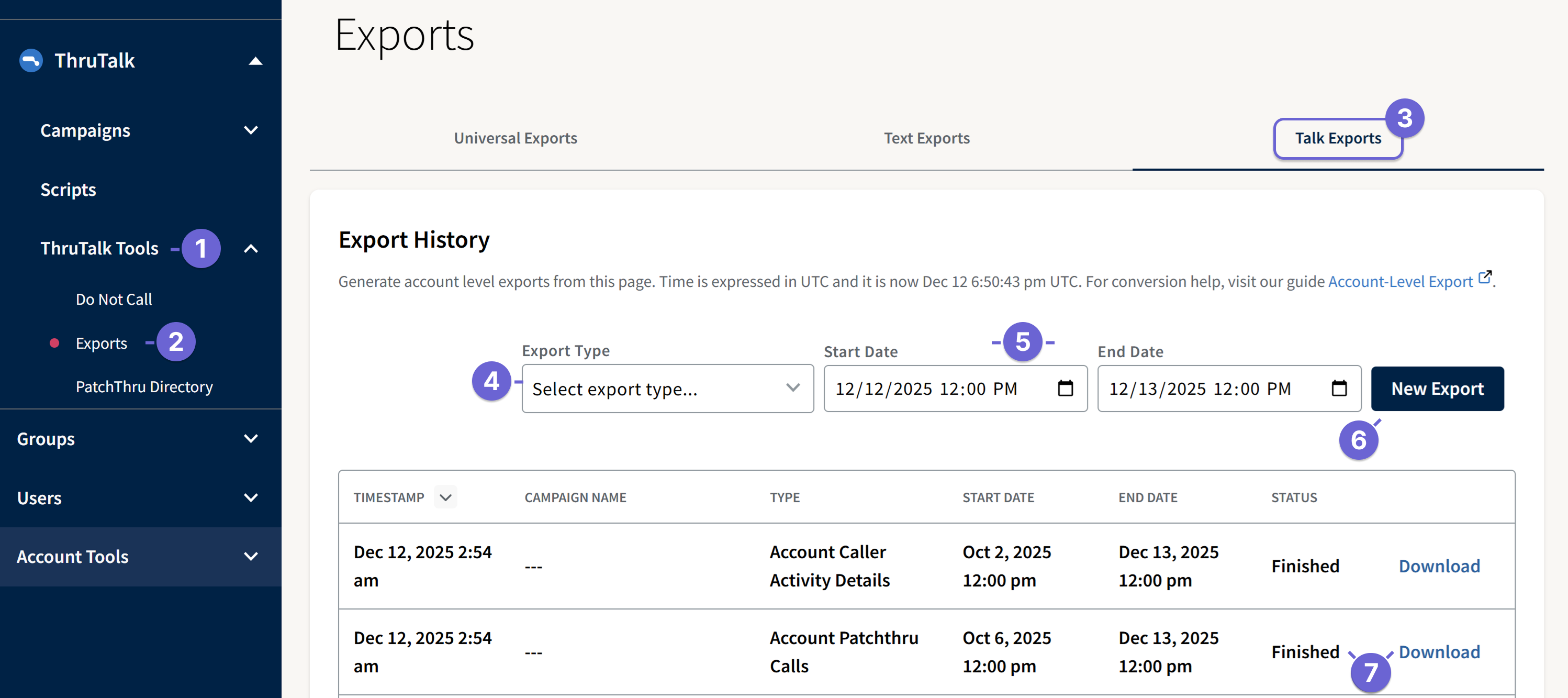
- In the admin view, open the ThruTalk Tools navigation menu.
- Click Export. This opens the Account-Level ThruTalk Exports page on the Talk Export tab.
- From the Talk tab, you can access exports for your calling data.
- In the Export Type menu at the top right, select the export type you want (for example, Account campaign dials).
- Enter your Start Date and End Date within the allowed 90-day range. The time can be adjusted and defaults to 12:00 p.m. UTC across a 24-hout time span.
- Click New Export to generate the file.
- When the export status changes to Finished, click Download to save the CSV to your computer.
Types of Account-Level Exports
Account-level ThruTalk exports are categorized into several types of exports. Each one answers a slightly different question about your calling data.
Account Campaign Dials
The Account Campaign Dials export gives you campaign-level call and script data for all campaigns with dials during your selected date range. Each campaign’s data is provided in a separate file. Use this export when you want to review outcomes and script responses at the campaign level while still working from a single export request.
Account All Dials
The Account All Dials export shows call results for all campaigns in a single CSV file, without script data. It’s useful when you want a high-level view of call volumes and outcomes across your entire account.
Talk Campaigns
The Talk Campaigns export provides campaign-level details and calling activity for all campaigns during your selected date range. Use this export when you want a high-level view of campaign setup, dial totals, caller activity, and campaign timing across your account.
Account Do Not Call
The Account Do Not Call export lists all contacts who are on your organization’s Do Not Call list, including entries added manually and those added through calling scripts. For more information, see our guide on Do Not Call Management for ThruTalk. For this export, you can request all records or input a specific date range, if preferred.
Account Caller Details
The Account Caller Details export summarizes each caller’s activity during the selected date range so you can evaluate performance, track call time, and review outcomes. The export includes one row per caller per reporting period, call session time, and a summary of call results for each caller. For more background on metrics and definitions, see the Caller Activity Details Report guide.
Account PatchThru Calls
The Account PatchThru Calls export provides details about PatchThru calls, including whether they were successful and which contact connected to which target for every campaign in the selected time period. The export includes one row per PatchThru attempt, contact and target identifiers, indicators of whether the PatchThru connection was successful, and associated campaign information.
Data Review Tips
Call Results vs. Script Results
When reviewing ThruTalk exports, it’s important to understand the difference between call results (what happened to the call) and script results (how callers logged outcomes in the script). For definitions and examples, see the Call Results guide.